UPM Factory Shutdown planner
Design the system around how people work: not around how the organisation is structured. Designing a digital planning experience for complex industrial shutdowns
00
problem
Shutdown planning was fragmented and largely manual. Teams relied on paper-based processes and external tools to coordinate complex factory shutdowns. This created challenges around: Coordinating multiple stakeholders Tracking tasks and dependencies Managing resources Communicating changes Maintaining safety and compliance Getting a real-time view of progress
solution
A centralised Factory Shutdown Planner The concept brought key planning activities into one experience. Plan → Schedule → Allocate → Execute → Monitor
Factory Shutdown Planner
Designing a digital planning experience for complex industrial shutdowns
Client: UPM / Metsä
Role: Senior UX Designer
Focus: UX Strategy · Service Design · Data Visualization · Product Design
Tools: Figma · Miro · Trello · Service design · Workshops
The problem
Shutdown planning was fragmented and largely manual.
Teams relied on paper-based processes and external tools to coordinate complex factory shutdowns.
This created challenges around:
Coordinating multiple stakeholders
Tracking tasks and dependencies
Managing resources
Communicating changes
Maintaining safety and compliance
Getting a real-time view of progress
The opportunity
How might we create one digital workspace that gives everyone a shared view of the shutdown process?
The approach
I treated the problem as a service design challenge, not simply a scheduling interface.
Understand
I interviewed core users and visited the factory floor to understand:
How shutdowns were planned today
Who was involved
Where information moved between teams
Which tools were being used
Where delays and communication gaps occurred
Map
I created a service map connecting people, processes and technology across the shutdown journey.
This revealed opportunities to centralise planning, improve visibility and clarify responsibilities.
Explore
I reviewed existing project-planning tools, including Primavera P6 and Microsoft Project, to understand established patterns for scheduling, dependencies and resource management.
The solution
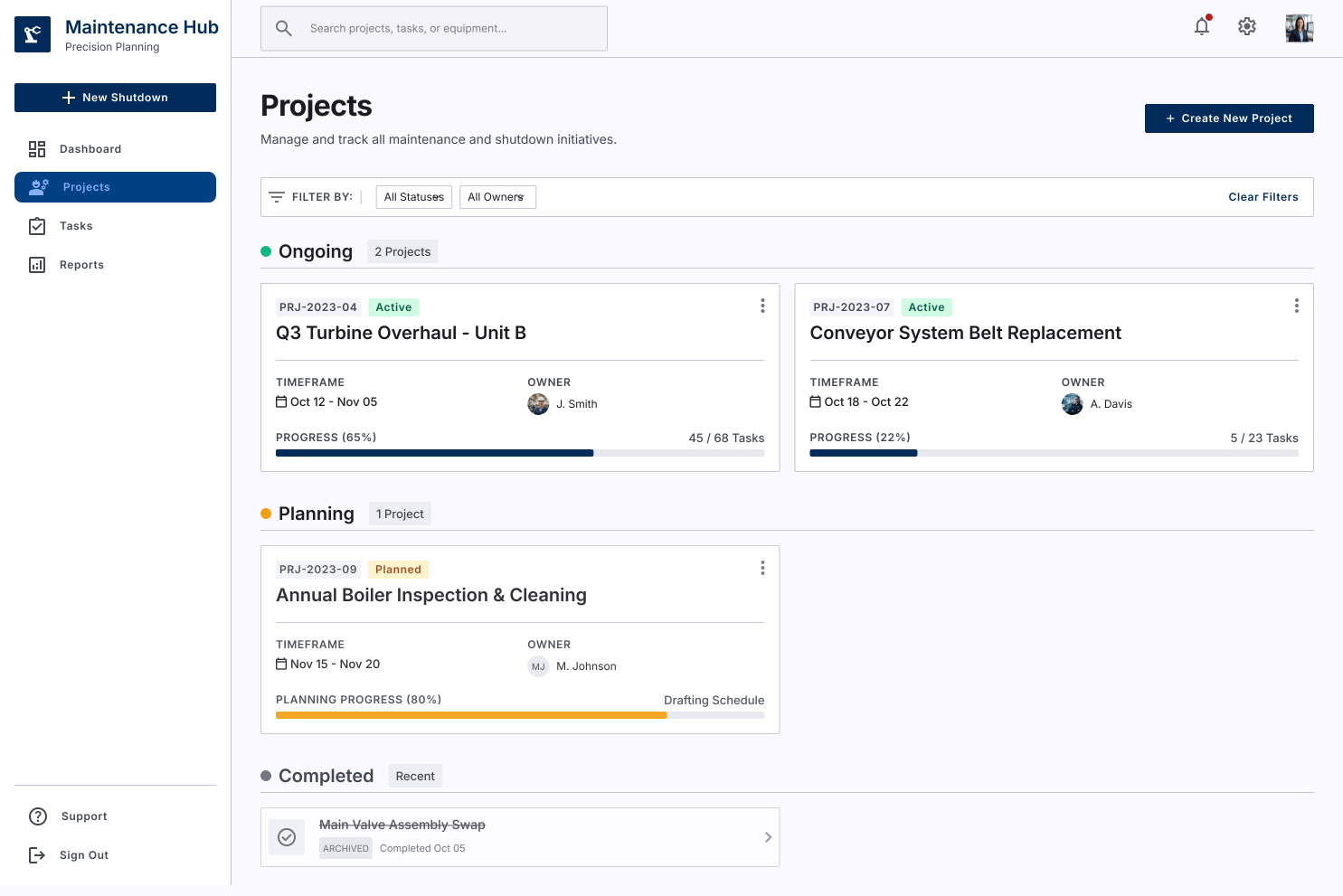
A centralised Factory Shutdown Planner
The concept brought key planning activities into one experience.
Plan → Schedule → Allocate → Execute → Monitor
Core experience
Dashboard
Overview of shutdown plans, completion and progress.
Timeline
Visualise tasks, sequence, dependencies and status.
Task management
Create tasks with detailed information, responsibilities and dependencies.
Procurement
Track materials and procurement items requiring approval.
Progress visibility
Give stakeholders a shared view of what's completed, what's next and where attention is needed.
Designing for complexity
Shutdown planning involves many stakeholders, tasks and dependencies.
Rather than exposing all of this complexity at once, I used progressive disclosure and visual hierarchy to help users move between:
Overview → Timeline → Task → Detail
The interface used visual scheduling and status information to make complex plans easier to understand at a glance.
From concept to prototype
I moved from:
User research → Service mapping → Use cases → Wireframes → Interactive prototype
I worked closely with client and development teams throughout the iterations, validating workflows and refining the experience based on stakeholder feedback.
The prototype explored:
Gantt-style planning
Task dependencies
Progress tracking
Resource allocation
Procurement workflows
Role-based information
Outcome
The POC validated the core concept and demonstrated the potential to improve:
Visibility
A shared view of plans, tasks and progress.
Coordination
Better alignment between teams and stakeholders.
Workflow efficiency
A more structured alternative to fragmented planning tools.
Operational reliability
Clearer task dependencies and status reduced the risk of missed activities and delays.
Further opportunities were identified around resource management and mobile use, informing the next stage of development.
What I learned
Complex enterprise UX starts with understanding the operation.
The most valuable part of this project wasn't designing the Gantt chart.
It was going to the factory floor, understanding how work actually happens, mapping the service, and translating that complexity into a usable digital experience.
Design the system around how people work—not around how the organisation is structured.
year
2024
timeframe
3 Months
tools
Figma · Miro · Trello
category
UI/UX
01

02

03

04

05

06


